PUSH API · v1a
iOS SDK
Reviewed: 2026-09-11. External console labels may change; use the linked official guidance and verify your SDK version.
Before you start: three separate connections
Installing the SDK, configuring a push service, and enrolling a device are separate steps. A successful library build does not establish delivery. Follow this guide using one device you own.
- Select the organization, project and app environment. Android and iOS use their own apps and push service settings.
- Open Settings → Push service connection, configure FCM or APNs, and check the verification state.
/app-environments/{appEnvironmentId}/providers - In Settings → SDK connection, obtain the public key for the same environment. Existing apps retain their storageNamespace. Customer SDK endpoints are fixed; never embed a server API key in a mobile app.
/app-environments/{appEnvironmentId}/settings/sdk
0. Prepare Apple APNs and app signing
- Apple Developer Account: verify your app’s Bundle ID and team, then obtain an approved APNs .p8 key under Certificates, Identifiers & Profiles → Keys.
- If a new key is needed and you are authorized to create one, open Keys → Add a new key → select Apple Push Notifications service (APNs) → Configure. Choose Sandbox, Production or Sandbox & Production so Environment permits the app’s signed aps-environment. Review Team Scoped (All Topics) versus Topic Specific for Key Restriction, and ensure the app’s Bundle ID/topic is permitted.
- In Kits Push service connection, verify the .p8 file, Key ID, Team ID, app Bundle ID/topic and APNs environment. Key ID and Team ID are different; verify any filename-derived Key ID against your Apple account.
- In Xcode’s app target, open Signing & Capabilities → + Capability → Push Notifications and select the correct Team. Do not add Background Modes indiscriminately for ordinary visible notifications; background processing has separate requirements and limits.
- Match the signed aps-environment entitlement, the SDK’s KitsAPNsEnvironment (.sandbox or .production) and the APNs environment of the push service connection. Do not infer the APNs environment from a Debug/Release build name or the Kits app environment type alone.
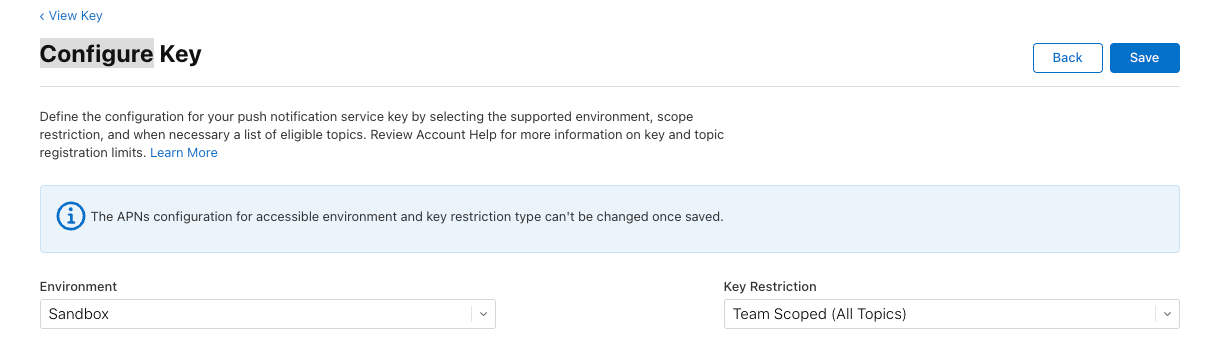
Apple key management · APNs registration and signing
See the shared push-service settings screen · The screenshot shows Android FCM. For iOS, use the APNs .p8 file, Key ID and Team ID, not a JSON file.
New managed SDK quick start
import KitsPush

// Once on MainActor, after wiring the AppDelegate bridge:
try Kits.initialize(publicKey: publicKey)
// Development-signed app instead:
// try Kits.initialize(publicKey: publicKey, options: KitsOptions(ios: KitsIOSOptions(apnsEnvironment: .sandbox)))
The SDK supplies the production origin and default storage, and reads the dashboard authentication policy. The updated SDK enables audience, event and activity collection by default while preserving saved opt-outs. Use collectionEnabled=false to pause collection until consent. Existing apps must retain their previous namespace across upgrades and key rotation. APNs defaults to production; development-signed apps explicitly select sandbox.
APNs token forwarding requires KitsPushAppDelegate or the AppDelegate forwarding bridge in the SDK README. SwiftUI uses UIApplicationDelegateAdaptor; scene-based apps also forward scene clicks. Initialization alone does not replace the app delegate.
| Shared optional setting | Meaning · default |
|---|---|
collectionEnabled | Unified collection gate · true. Start false to pause collection; default true never clears a saved opt-out |
foregroundPresentationPolicy | Foreground presentation policy · PRESENT / .present |
shouldDisplay | Optional presentation callback · allowed if omitted, vetoed on error |
identityAuthProvider | VERIFIED account proof provider · omitted |
audienceCollectionEnabled | Audience metadata and sessions · true. Explicit false stays disabled |
notificationEventsEnabled | Actual receipt/click reporting · true. Also requires message track_events |
observationOptions | persistNotificationEvents · true / activityDistributionEnabled · true |
To pause collection before consent, initialize with collectionEnabled=false. Use Kits.setCollectionEnabled(true) after consent, or false to stop. This is separate from push opt-out and deletion of existing server records. Explicit false feature flags remain disabled even after unified enable. iOS extension receipt reporting is configured separately.
Platform-only settings are grouped under android: KitsAndroidOptions (FCM mode and notification resources) or ios: KitsIOSOptions (APNs environment and delegate integration). shouldDisplay controls foreground presentation and new Android SDK-managed display, but cannot block OS-rendered background notifications on iOS or older Android SDKs. Initialization does not prompt for permission.
The core-only configuration and OS callback examples below are only for maintaining manual low-level integrations; managed initialization above owns that wiring instead.
Supported baseline: iOS 15+, Swift 6 and Xcode 16.4+. Host-side macOS test support is not a macOS application product commitment.
1. Add the Swift package
Obtain reviewed kits-ios source or an approved package location from your operator. These docs do not invent a public repository or release URL. In Xcode, use Add Package Dependencies → Add Local, select /path/to/kits-ios, and link the KitsPush product to your app target.
2. Configure and choose the APNs environment
import KitsPush
import UIKit

// Legacy core integration only: keep this app's existing namespace unchanged.
// New integrations use Kits.initialize(publicKey:); the SDK manages storage.
let configuration = try KitsPushConfiguration(
    publicKey: configuredPublicKey,
    storageNamespace: configuredStorageNamespace,
    apnsEnvironment: configuredAPNsEnvironment
)
let kitsPush = try await KitsPushClient.configure(configuration)
await MainActor.run {
    UIApplication.shared.registerForRemoteNotifications()
}
configuredPublicKey and configuredStorageNamespace come from the app environment settings. Set configuredAPNsEnvironment to KitsAPNsEnvironment.sandbox or .production according to the signed aps-environment entitlement. Your app needs the Push Notifications capability and matching signing configuration.
3. Forward this launch’s APNs token
Call registerForRemoteNotifications on every launch and forward the token from that launch’s delegate callback. Do not substitute a cached old token. This is a fragment for your existing delegate; the app owns the client lifecycle.
// In your existing UIApplicationDelegate; kitsPush is the configured client.
func application(
    _ application: UIApplication,
    didRegisterForRemoteNotificationsWithDeviceToken deviceToken: Data
) {
    Task { _ = await kitsPush.registerAPNsToken(deviceToken) }
}

// Observe acknowledgement separately from the local .queued result.
for await state in kitsPush.syncStates() {
    if case .synced = state {
        // Latest desired device state acknowledged by Kits.
    }
}
Permission example: report the actual choice
import KitsPush
import UserNotifications

// In a host-owned async action after explaining why notifications are useful.
// kitsPush is the same retained client configured at app startup.
let center = UNUserNotificationCenter.current()
let before = await center.notificationSettings()
if before.authorizationStatus == .notDetermined {
    do { _ = try await center.requestAuthorization(options: [.alert, .badge, .sound]) }
    catch { /* Show a safe error; do not pretend permission was granted. */ }
}
let settings = await center.notificationSettings()
let permission: KitsPushPermission
switch settings.authorizationStatus {
case .notDetermined: permission = .notDetermined
case .denied: permission = .denied
case .authorized: permission = .authorized
case .provisional: permission = .provisional
case .ephemeral: permission = .ephemeral
@unknown default: permission = .notDetermined
}
_ = await kitsPush.reportPermission(permission)
// Independently forward the user's real in-app choice:
// _ = await kitsPush.setPushPreference(.optedIn) or .optedOut
// Re-read settings after returning from iOS Settings, without prompting again.Rich images: add an Xcode extension target
The SDK provides image download/validation helpers, but cannot create a signed app extension for you. Image notifications require a Notification Service Extension embedded in the host app. Skip this step for text-only notifications.
- In Xcode, use File → New → Target → Notification Service Extension. Sign with the appropriate Team and verify the extension is embedded in the app.
- Link the KitsPushNotificationService product to the extension target, separately from the main app’s KitsPush product. Replace the generated NotificationService class with the following:
import KitsPushNotificationService

// Image-only default; no APNs private key or device bearer belongs here.
final class NotificationService: KitsNotificationServiceExtension {}
Verify NSExtensionPrincipalClass points to this class and APPLICATION_EXTENSION_API_ONLY=YES. Use a public, non-redirecting HTTPS PNG/JPEG URL and test text fallback on failure. The optional section below details size bounds and manual forwarding.
5. Verify in the dashboard and on the device
- After SDK synchronization, find the installation under Audience → Push subscriptions in the same app environment. Check installation/subscription IDs, platform, permission and preference; never share raw tokens.
- Mark only your own installation as a test device and select it for a direct send. Recording a send as a test still sends a real notification and bypasses no permission, consent or push service checks. Start with one text-only SERVICE notification.
- In Delivery → Sent messages, inspect the request and individual delivery results. Dashboard/API source and standard/test purpose are separate dimensions. Acceptance or push service acknowledgement is not device display or click success.
- Check foreground, background, cold-start notification taps, and deny/re-enable flows separately. Add images, tags, localization and receipt observation only after basic delivery works.
Troubleshoot the failing stage
| Symptom | First checks |
|---|---|
| No installation appears | Check app environment/public key, API origin/network access and SDK errors. configure/Queued is not a server acknowledgement. Do not delete database or app data as a first fix. |
| APNs token / BadDeviceToken | Check the current-launch APNs delegate token, signed entitlement, Bundle ID/topic and APNs environment match. Do not substitute an old or fabricated token. |
| Accepted but no notification | Inspect individual delivery results, push service errors, OS permission/app preference, channel/Focus settings, then foreground presentation. Do not repeatedly resend before checking the first result. |
| Duplicate notifications | Check whether both OneSignal and Kits sent the event, or the app rendered an OS-displayed notification again. Assign each backend event explicitly to either the existing platform or Kits. |
4. Keep ownership of notification delegates
- Your app owns UNUserNotificationCenterDelegate. Call handleWillPresent for foreground notifications and handleNotificationResponse for response callbacks.
- A nil result means the notification belongs to another handler. Call each OS completion handler exactly once on every path; do not retain it while waiting for navigation.
- Report actual OS permission through reportPermission and the in-app choice through setPushPreference. The SDK does not obtain consent or open links for you.
- queued means local persistence. Observe synced through syncStates for server acknowledgement, and request synchronize when needed.
Optional: actual received/clicked observations
SDK source with the collection-defaults update enables notificationEventsEnabled and persistNotificationEvents by default. Previously published versions may differ; check your installed release. Message track_events=true is still required separately; omitted API fields and false in saved drafts are not rewritten. Saved opt-outs and collectionEnabled=false take precedence. Review the app’s consent and privacy notices.
// Optional argument in KitsPushConfiguration, after host consent:
notificationEventsEnabled: true

// Forward actual OS callbacks:
kitsPush.handleWillPresent(notification)
kitsPush.handleNotificationResponse(response)
Add {"track_events": true} to the message. Reporting requires a server-issued kits_delivery_id and the exact version marker; never invent this reserved ID. CLICKED does not create RECEIVED, and push service acceptance or display is not inferred as receipt.
Custom host adapters may await reportNotificationReceived(payload) or reportNotificationClicked(payload). willPresent observes RECEIVED; actual responses except dismissals observe CLICKED. Background receipts require a receipt-enabled Notification Service Extension, including for ordinary alerts without images. Use the SDK’s bounded processing rather than delaying OS completion yourself.
Permanent failures such as an authentication rejection (401) are not retried indefinitely. Reporting does not change notification delivery or analysis completion.
Message details load SDK observations automatically and refresh every five seconds for up to five minutes while visible. The chart uses server report-arrival time, which can differ from the actual device click time. Retained historical buckets remain available after refresh or when you return later.
Background receipts for alerts without images
- Embed a signed Notification Service Extension target and link KitsPushNotificationService. An SDK library cannot automatically add this host target.
- Enable both event collection and iOS background receipts in the dashboard, or set track_events=true and track_receipts=true in the API. The server adds mutable-content and a scoped receipt token to the ordinary APNs alert.
- In KitsNotificationServiceExtension.receiptConfiguration, read current consent visible to the extension. Return KitsNotificationReceiptConfiguration(reportingEnabled: true) only when allowed, otherwise nil. The app SDK’s opt-out is not automatically shared across processes; use shared settings such as an App Group.
Optional: install the image extension
- Add a Notification Service Extension target to the host app in Xcode. Link only KitsPushNotificationService there, not the app’s KitsPush product. Keep APPLICATION_EXTENSION_API_ONLY=YES and correct signing/provisioning.
- Retain the helper below and forward both receive and expiry methods. Send image_url through the normal message field; Kits sets mutable-content. Verify images and fallback text on a physical device.
import KitsPushNotificationService
import UserNotifications

final class NotificationService: UNNotificationServiceExtension {
    private let images = KitsNotificationService()
    override func didReceive(_ request: UNNotificationRequest,
        withContentHandler handler: @escaping (UNNotificationContent) -> Void) {
        images.didReceive(request, withContentHandler: handler)
    }
    override func serviceExtensionTimeWillExpire() {
        images.serviceExtensionTimeWillExpire()
    }
}Optional: host-registered iOS buttons
Localize titles and define categories/actions in host code. Register the complete set once at launch without racing another SDK. ios_category must match a deployed identifier; there is no dynamic server button array.
let category = UNNotificationCategory(identifier: "ORDER_V1", actions: [
    UNNotificationAction(identifier: "VIEW_ORDER", title: "View order", options: .foreground)
], intentIdentifiers: [], options: [])
let actions = try KitsNotificationActions(categories: [category])
let all = try actions.categoriesForRegistration(preserving: otherHostCategories)
UNUserNotificationCenter.current().setNotificationCategories(all)

// In the real response delegate, after forwarding to kitsPush once:
if let event = actions.action(for: response) {
    // Authorize current user and business data before handling event.actionIdentifier.
}
Up to 32 categories with 1–3 plain actions each; identifier collisions throw. Unknown buttons, foreign payloads, default taps and dismissals return nil. Handle default taps separately and complete exactly once. Buttons are not guaranteed on older or unconfigured apps.
SDK login and logout
- Each project environment has one mode that applies to all of its apps. The first app of a project environment starts in BASIC; apps added later follow that environment’s mode. New SDK convenience initialization discovers the dashboard policy without a duplicate app setting. BASIC needs no customer authentication callback, JWT endpoint or signing key. BASIC does not verify external ID ownership: a client in the same environment can claim another UID and may receive its notifications. Use it when accepting that limitation. VERIFIED authentication failures never switch to BASIC automatically.
- For VERIFIED, a JWT from your trusted backend is required. Connect the SDK authentication callback at app startup. Your backend verifies the session and active account, and checks that the requested external_id matches the session UID before signing a JWT locally with createIdentityTokenSigner. No Kits token-mint HTTP request is made; the default TTL is 300 seconds. Never trust a user ID supplied by the app alone.
- Generate a key pair once in your own environment with generateIdentityKeyPair. Import only keyId and publicKeyPem into the project environment under Dashboard project settings → SDK setup; keep privateKeyPem in your backend secret store. Every app of that project environment shares the imported public keys. Never upload a private key to Kits. Rotate by importing the new public key, switching your signer, then revoking the old key. Never automatically fall back to legacy minting or unverified login after JWT signing or verification fails.
- Both modes use the installation deviceToken to read GET /v1/installations/{id}/identity and change the binding with POST /v1/installations/{id}/identity. VERIFIED LOGIN sends token only; BASIC LOGIN sends external_id only. LOGOUT omits both token and external_id. The SDK manages expected_binding_id, operation_id, durable storage, serialization and retries. Never log proofs or device tokens.
- The SDK persists each operation mode; old journals remain VERIFIED. After restarting with a different mode, it reconciles the completed state first, then halts an unfinished LOGIN with IDENTITY_AUTH_MODE_CHANGED. Reassert login for the current session to pass through a logout barrier before creating a new operation in the selected mode.
- The new AUTO flow reads the binding and policy revision together from GET /v1/installations/{id}/identity-policy. A changed expected_policy_revision on a new LOGIN returns 409 IDENTITY_REBIND_CONFLICT for reconciliation. Failed or malformed policy responses never mean BASIC. Previously sent operations are reconciled first and VERIFIED proofs are never silently removed. LOGOUT uses the existing identity path without a policy lookup. Explicit modes and old journals remain compatible.
- The JWT uses ES256, aud=kits:identity, the device’s own app environment as iss, identity.external_id, and integer-second iat/exp. TTL is 1–3600 seconds; the JWT is not bound to a device, binding or operation. If stolen, it may be reused on another authenticated installation while valid, and its contents are not encrypted. Use HTTPS and Cache-Control: no-store; never log private keys, JWTs or request bodies. Do not issue a JWT per message.
- Legacy compatibility: identity.createToken and POST /v1/identity-tokens remain for existing kitid1 proofs but are deprecated for new integrations. Only that legacy HTTP path needs an identity:write server key and installation/binding/operation context. Local JWT signing needs no Kits API key; messages.create separately uses a messages:send server key.
- A locally queued operation is not a remotely confirmed logout. Check identityState for the confirmed result. Do not run this flow concurrently with legacy backend identify/logout calls.
The key setup and signing example below apply only to VERIFIED.
import { createIdentityTokenSigner } from '@marco-inc/kits-node';

// VERIFIED backend only: load the private key from your secret store.
const signer = createIdentityTokenSigner({
  appEnvironmentId, keyId, privateKeyPem, ttlSeconds: 300,
});

// In an authenticated handler, after checking the active account:
if (request.external_id !== verifiedUid) throw new Error('Session changed');
const result = signer.sign(verifiedUid); // {token, expires_at}; no HTTP call
// Return only to the authenticated app with Cache-Control: no-store.
The calls below are separate examples for login events, logout events and state inspection. Do not execute them together in sequence.
// Once, on MainActor (APNs production by default):
try Kits.initialize(publicKey: publicKey)

// On authenticated login:
Kits.login(userID)

// On logout (a separate event):
Kits.logout()

// Local submission state is not remote confirmation:
Kits.identitySubmissionState
Read the exact authentication, request and response contracts